Remote timestamps are available from version 2026.
Every line in a task log is stamped with two times:
- Server (or “Observed”) is when Octopus Server observed the output. Octopus has always recorded this time, the task log is always ordered by it, and it’s what you see by default.
- Remote (or “Occurred”) is when the deployment target or worker that produced the output says it occurred, according to the remote machine’s clock.
Choose which timestamps to show
- Open the deployment, runbook run, or other task, and select the Task Log tab.
- Open the view settings menu.
- Under Timestamps, choose Hide, Server, or Remote.
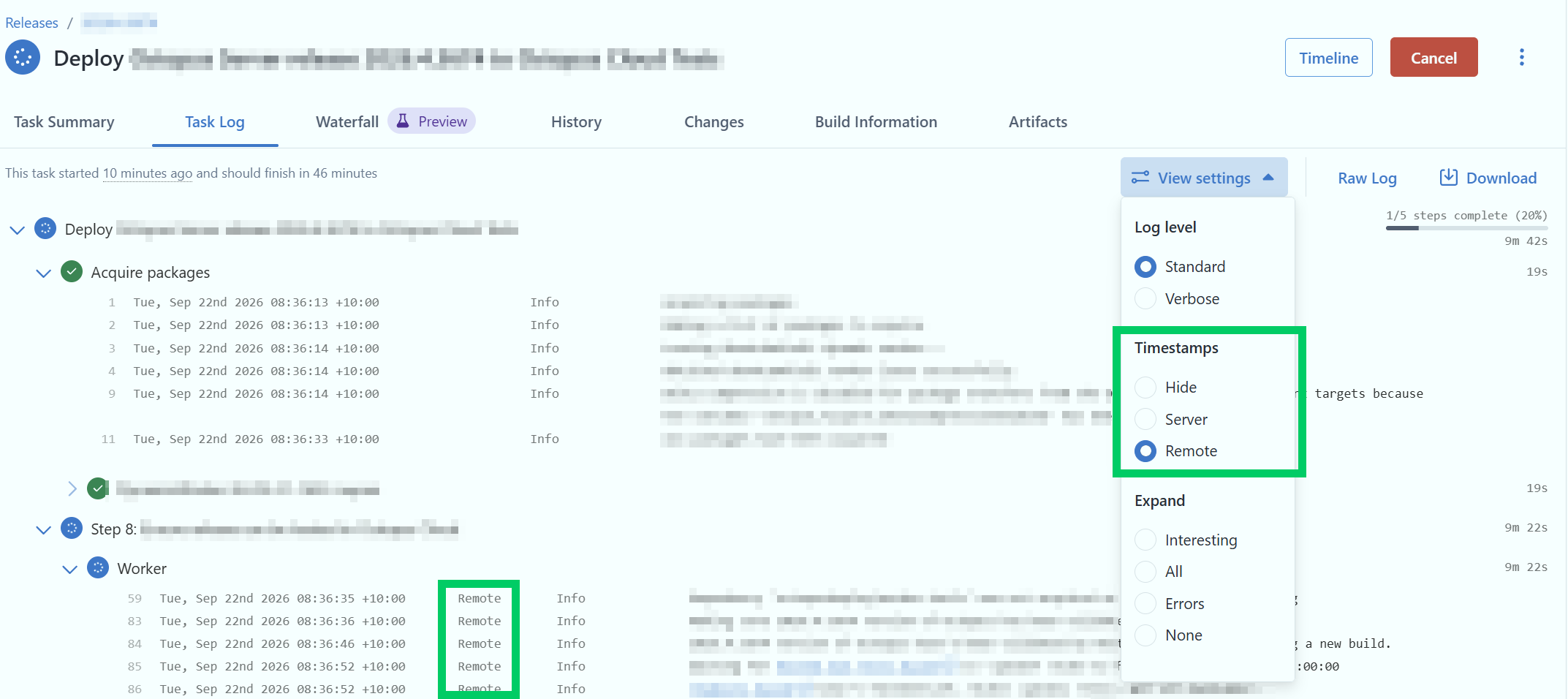
In Remote mode, lines that carry a time reported by a target are marked Remote. The rest fall back to the server time, because that’s the only time Octopus has for them. Hover over any timestamp to see the other time for that line.
Remote times come from the clock on another machine, so a target with a clock that’s out of step with your Octopus Server will report times that look wrong.
Why the two times differ
Output from a remote machine doesn’t reach Octopus Server the instant a script writes it. A polling Tentacle only sends output when it next checks in, a slow network adds delay on the server-time of remote output.
Downloading the raw log
The raw task log uses server timestamps by default. To get remote timestamps instead, add the timestamps query parameter to the raw task log endpoint.
GET/api /{spaceId} /tasks /{id} /raw?timestamps=Remote
Valid values are Server (default) and Remote.